
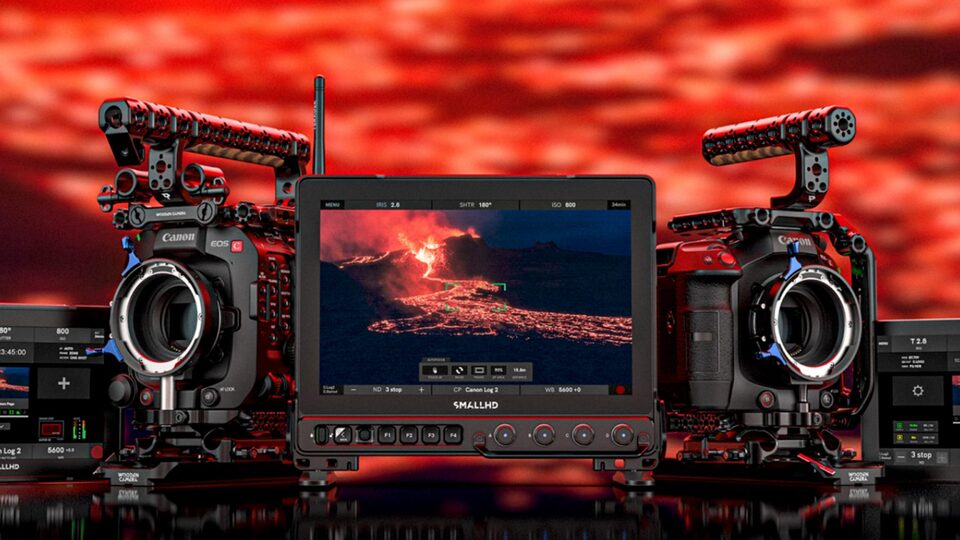
SmallHD announces the release of its Camera Control integration for Canon cinema cameras.
The new integration allows filmmakers to adjust critical camera settings directly from a SmallHD monitor, streamlining production and saving time on set.
PageOS Platform Integration
Built on SmallHD’s PageOS platform, Camera Control lets users view shots, fine-tune settings, and navigate deep Canon menu systems without leaving the monitor interface. Features include:
-
Adjust shutter speed, aperture, ISO, ND, codec, and trigger record start/stop
-
Touch-to-focus functionality
-
Full access to Canon camera menus
-
Combine Camera Control with other PageOS monitoring tools on customizable pages
Supported Canon Cameras
Camera Control is currently available for:
-
EOS C300 Mark III
-
EOS C500 Mark II
-
EOS C400
-
EOS C70
-
EOS C80
Supported SmallHD Monitors
Camera Control for Canon works with:
-
Cine 5
-
Ultra 5 / Ultra 5 RX / Ultra 5 TX
-
Cine 7
-
CINE7 500 RX / CINE7 500 TX / CINE7 SK RX
-
Ultra 7 / Ultra 7 RX (750 & 1500) / Ultra 7 TX (750 & 1500)
-
Ultra 10 / Ultra 10 RX
-
Cine 13
-
Cine 18
-
Cine 24
-
Vision 17 / Vision 24
-
OLED 22 / OLED 27
-
Quantum 27 / Quantum 32
Statement from SmallHD
Matt Eidenbock, Product Manager at SmallHD, said: “Our goal has always been to give filmmakers complete control and flexibility on set. Bringing Canon compatibility to our Camera Control lineup delivers more efficiency, less back and forth, and a more seamless monitoring experience.”